
Study Away: Domestic
Off-campus programs need more than a shared folder.
Sports trips. College tours. Class trips to the national park. Service learning weekends.
Campus Credit gives every off-campus program the same structure your on-campus courses already have — application, conduct acknowledgments, arrival tracking, incidents, and academic credit in one shared institutional record.

to Yosemite
Sports tournaments, class trips, college tours, service weekends — all in one system
Application through credit posting — no parallel spreadsheets
Every decision, document, and incident logged automatically in one institutional record
Typical time from contract to fully live — no long implementation project
Overview
Campus Credit manages your Study Away program from application to credit posting
Think of every time students leave campus for something academic, athletic, or experiential — a sports tournament, a college tour, a class trip to a national park, a service learning weekend, a clinical placement. Each of those trips carries institutional responsibility: conduct expectations, emergency contacts, travel confirmations, and often academic credit. Campus Credit replaces the email chains and shared drives that currently hold those programs together with a single institutional record — structured, auditable, and ready for any review.
Academic, administrative, and program-level reviews routed automatically with timestamped decisions and status visible to every office involved
Waivers, conduct agreements, and pre-departure requirements collected before departure — arrival confirmation and incident reporting maintained while students are off-campus
Course approvals, learning agreements, and registrar review ensure academic credit posts accurately — with a structured export or SIS-ready handoff to Banner or Colleague
Real-World Use Cases
If students are leaving campus, Campus Credit can manage it
Select a program type to see how Campus Credit handles the workflow — from the permission slip through the credit posting.
Use Case — Athletics & Activities
Sports trips and athletic travel — managed, not just chaperoned.
The baseball team travels to a tournament in Arizona. The swim team drives to a regional meet. The debate team flies to a national competition. Every one of these trips carries institutional responsibility — and most are managed through a coach's spreadsheet and a group text. Campus Credit gives your athletics and student activities offices a structured system for all of it.
Destination, dates, roster size, eligibility requirements, and required documents set up before the trip opens for sign-ups
Travel conduct expectations and emergency contacts collected digitally — no paper forms distributed at practice
One dashboard shows who is fully cleared to travel and who has outstanding documents — before departure day
Coach or advisor confirms arrival at the destination — any incident is documented in the system, not in a text thread
Every trip fully documented — who traveled, who signed what, and what happened — retrievable years later if needed
What this looks like in Campus Credit
Coach sees at a glance who is cleared, who is missing a form, and who needs a follow-up — without calling the office
Travel conduct expectations, emergency contacts, and parent notifications collected and signed online before the trip
Any behavioral or safety incident documented in real time and attached to the student — not buried in a coach's notes
Every trip archived with full documentation — available for student conduct review, insurance claims, or risk management
Use Case — Student Recruitment & Advising
College tours — structured, not just a bus ride.
Counseling and advising offices organize college tours for prospective students, dual enrollment cohorts, or first-year bridge programs. Students board a bus, visit three campuses, and come home. Somewhere in between, there's a permission form, an emergency contact, and an itinerary — usually all on paper. Campus Credit gives your counseling office a system for the whole thing.
Destination colleges, dates, roster size, and eligibility — high school dual enrollment students, first-gen cohort, etc.
Digital permission forms and emergency contacts collected — with automatic confirmation emails to families
One roster view shows who is registered, who has parental consent, and who still needs to complete their form
Advisor or chaperone logs arrival — so the institution has a timestamped record of where students were
Participation documented for grant reporting, dual enrollment outcomes tracking, and first-gen program metrics
What this looks like in Campus Credit
Automated emails to families when students register — with consent confirmation tracked in the system
Multiple stops on one trip — each arrival logged so the institution knows where students are throughout the day
Participation data exportable by cohort, demographic, or program — ready for Title V, Guided Pathways, or federal grant reporting
High school students on a college tour managed through the same system as their dual enrollment application
Use Case — Academic Field Experiences
A geology class at Yosemite. A history class at a Civil War site. A biology class at a wetlands preserve.
Faculty regularly take classes off-campus for field experiences tied directly to course content and credit. These trips require conduct agreements, liability waivers, emergency contacts, and sometimes academic deliverables — and most faculty manage all of it through email and a Google Form. Campus Credit gives the faculty member a structured program shell and the registrar a clean credit record at the end.
Destination, date, course linkage, required waivers, and any academic deliverables or completion requirements defined upfront
Liability waiver, emergency contact, health disclosure, and any site-specific safety acknowledgment collected digitally
One view shows who has completed all required forms — and who still needs to before the bus leaves
Faculty or a designated chaperone confirms the group is on-site — any safety incident documented immediately in the student record
Faculty submits completion for each student — the registrar reviews and credit hands off cleanly to Banner or Colleague
What this looks like in Campus Credit
Field trips tied directly to a course section — so completion and credit are tracked against the right enrollment record
Different waivers for different destinations — Yosemite has different liability language than a museum or a courthouse
Instructor sees one roster with clearance status — who is ready, who isn't, before the trip date
No chasing the registrar at the end of term — completion routes directly to a credit posting queue
Use Case — Community Engagement
Service learning weekends, community projects, and volunteer programs tied to course credit.
Sociology classes that spend a weekend at a food bank. Environmental science students restoring a trail. Nursing students staffing a community health fair. These programs blend community engagement with academic credit — and require site partner agreements, service hour tracking, and reflection documentation on top of standard travel requirements. Campus Credit handles all of it.
Community partner details, site safety acknowledgment, minimum service hours, and reflection requirements defined per program
Extended waivers, code of conduct expectations, and site-specific safety acknowledgments collected before confirmation
Students matched to site partners based on program criteria — each placement confirmed and documented
Completion criteria — hours served, reflection submitted, faculty supervisor sign-off — collected and documented per student
Academic credit, service-learning transcript notation, or community engagement designation posted to the student record
What this looks like in Campus Credit
Community partner MOU details, site contacts, and safety documentation stored per program — not in someone's email
Hours served and reflection submissions collected digitally — faculty supervisor confirms completion per student
Academic credit, service-learning notation, or co-curricular recognition — configured per program, posted cleanly to SIS
Community engagement data exportable by program, demographic, or term — structured for civic engagement grants and Title reports
Use Case — Clinical & Professional Placements
Nursing rotations. CTE internships. Education student teaching. Social work field placements.
Professional programs send students to clinical and internship sites all semester long — hospitals, schools, nonprofits, government agencies. Each placement requires a site agreement, background check documentation, liability coverage, and a completion record tied to course credit. Most programs track all of this in a combination of spreadsheets and coordinator memory. Campus Credit replaces that with one structured system.
Site partner agreements, required certifications, background check documentation, and clinical hour requirements set per site type
Background check clearance, immunization records, liability insurance, and site-specific acknowledgments collected before placement
Each student matched to a site and supervisor — placement documented with start date, site contact, and clinical requirements
Hour logs and supervisor evaluations collected per rotation — with completion milestones visible to the coordinator
Clinical hours and competency completion route to the registrar for credit posting — clean, auditable, accreditation-ready
What this looks like in Campus Credit
Background checks, immunizations, and liability documentation tracked per student and per site — not in a coordinator's inbox
Students log hours, supervisors confirm — coordinator has a real-time view of completion across all active placements
Every placement, every hour, every evaluation — archived and retrievable for nursing board, CAEP, or other accreditation reviews
Students rotating across multiple sites in one term — each rotation tracked separately with its own completion record
Use Case — Academic Research
Faculty-mentored research at an off-campus lab, archive, or field site.
Independent study and undergraduate research programs send students off campus to conduct research — at a national lab, a museum archive, a coastal field station, or a government agency. These programs are small, high-touch, and credit-bearing — but almost never have a system behind them. They live in a faculty member's email and a handshake agreement. Campus Credit gives them the same structure as any other off-campus program.
Research site, duration, credit linkage, deliverables, and required site access documentation configured per project
Research plan, faculty sponsor agreement, and any site-specific NDA or safety acknowledgments collected before approval
Research plan routed for review — approval documented with the student's record, not buried in an email thread
Check-ins, deliverable submissions, and faculty notes tracked against the original research plan throughout the term
Faculty confirms deliverables received and accepted — registrar posts independent study or research credit cleanly to the transcript
What this looks like in Campus Credit
Proposal submitted, faculty and department review documented — the approval record exists outside of email for the first time
Site-specific agreements, NDAs, and safety acknowledgments collected and stored with the student's research record
Faculty track progress against the original plan — check-ins logged, deliverables confirmed, completion documented
Full documentation trail supports IRB review, undergraduate research program reporting, and accreditation visits
The Problem Today
Most Study Away programs run on disconnected tools.
Applications, approvals, conduct acknowledgments, and pre-departure requirements are spread across PDFs, emails, and shared drives — owned by different offices with no single source of truth.
Once students leave campus, visibility drops. Arrival, participation, incidents, and academic credit become harder to track — introducing risk for students and liability for the institution.
A structured Study Away workflow protects students and institutions while keeping programs scalable — without adding staff or switching to a new SIS.
Faculty directors, advisors, and student life staff each manage their piece in separate email threads — no shared view of who is approved, who is pending, or who is missing documents
No arrival confirmation, no check-in tracking, no structured incident log — if something goes wrong off-campus, the documentation is often missing or incomplete
Course pre-approvals and completion records aren't captured cleanly — so credit posting requires staff to manually piece together what each student did and whether it counts
One shared institutional record — every application, every approval, every incident, and every credit outcome tracked from day one through program close
Supported Program Types
Built for the most common domestic Study Away formats
Campus Credit is built to manage the most common and operationally complex domestic Study Away programs end to end — from application through credit posting, all without workarounds or parallel systems.
Structured programs led by your institution's faculty — cohort-based, destination-specific, and tied to course credit — with full application, approval, conduct, and credit workflows.
.svg)
Faculty director access and roster oversight
Student application and conduct acknowledgment
Pre-departure checklist and clearance tracking
Arrival confirmation and in-program check-ins
SIS-ready credit handoff at close
Off-campus field experiences, clinicals, site visits, and experiential learning tied to course requirements — with site agreements, placement tracking, and completion documentation.
Site partner agreement and contact management
Student placement tracking and outcomes
Site-specific waivers and safety acknowledgments
Completion criteria and faculty sign-off workflows
Flexible credit or co-curricular recognition outcomes
Individual or small-group research programs conducted off-campus — with faculty sponsor oversight, research plan approval, and academic credit tied to deliverables.
Research proposal and faculty sponsor approval
Independent study agreement and credit mapping
Progress milestone and deliverable tracking
Completion documentation for credit posting
Full audit trail for accreditation and IRB support
Short-term domestic travel embedded into existing courses — weekend or week-long trips that require conduct agreements, travel logistics tracking, and academic credit documentation.
Compressed pre-departure timeline and checklist
Conduct agreements and parent/guardian notifications
Group clearance view for faculty before departure
In-trip check-in and incident logging
Fast program close with credit or completion posting
How It Works
Study Away from setup to credit — in six stages
Every Study Away student moves through the same structured workflow — from program configuration through pre-departure compliance, off-campus tracking, and academic credit, with clear ownership at every stage.
Institutions configure Study Away programs with eligibility rules, application deadlines, required documents, conduct expectations, and approval paths based on program type, destination, or department.
Role-based access is set for study away staff, academic departments, faculty directors, registrars, and student services — each group sees only what they need to review and manage.
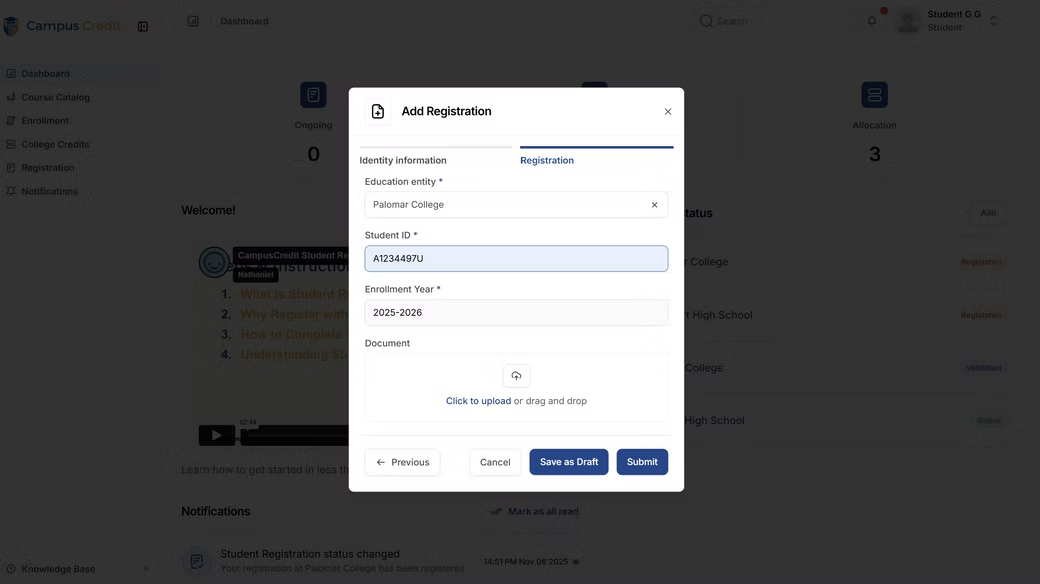
Students complete a guided application, upload required documents, sign conduct agreements and waivers, and complete pre-departure requirements in one structured workflow.
Applications route through academic, administrative, and program-level reviews. Pre-departure checklists, orientations, and travel confirmations are tracked so staff know who is cleared to go.
Institutions confirm arrival, manage required check-ins, and document incidents if needed. Every incident is logged, timestamped, and attached to the student's program record for risk management.
Course approvals, learning agreements, and registrar reviews support clean credit posting. Program records are finalized with a complete, auditable history from first application to transcript.
Key Capabilities
Everything your Study Away office needs to scale
Campus Credit gives you a complete Study Away infrastructure — from program configuration and application intake through compliance tracking, off-campus visibility, and academic credit posting.
Configure any Study Away program type with eligibility rules, deadlines, approval paths, and document requirements — all in one catalog your office maintains without IT involvement.
Centralize student applications, document uploads, e-signatures, and multi-office reviews — with parallel or sequential routing, clear ownership, and timestamped decisions on every request.
Collect and track conduct agreements, waivers, health disclosures, and emergency contacts in one secure system — ensuring nothing is missing before a student leaves campus.
Manage pre-departure checklists, orientations, and clearance status — then confirm arrival, track required check-ins, and document any issues while students are off campus.
Staff submit structured incident reports — incident type, date, location, student, and actions taken — attached directly to the student's program record for risk management and accreditation documentation.
Course pre-approvals, completion documentation, and registrar review ensure credit posts accurately — with a structured export or SIS-ready handoff to Banner or Colleague and a full audit trail.
Who It's Built For
Designed for every office in the process
Campus Credit Study Away is designed so institutions don't have to bend existing policies, approvals, or academic standards to fit a generic travel platform.
Colleges & Universities
Study Away, Student Life, registrars, and academic departments work from one shared system instead of managing applications, approvals, and records across emails and spreadsheets.
Faculty & Program Directors
Faculty leaders can manage applications, review eligibility, track readiness, and confirm completion without creating ad hoc forms or relying on offline spreadsheets outside the institutional record.
Students & Support Offices
Students complete a structured process with defined expectations, while advisors and support offices can see application status, conduct completion, and outcomes without chasing anyone for information.
SIS Integration
Works with the systems you already run
Campus Credit doesn't replace your SIS or scheduling tools. It gives you one clean source of truth for dual enrollment applications, approvals, rosters, and grades — then moves that data into Banner, Colleague, PeopleSoft, or any SIS your college already uses.
Download pre-filtered files for fast upload into your SIS — no manual reformatting, no spreadsheet cleanup
Campus Credit manages approvals, status changes, and instructor updates — your SIS only receives final, accurate data
Approved rosters sync to your Learning Management System so instructors have accurate class lists from day one
Begin with clean exports and build toward API integration at your own pace — Campus Credit works at whatever level your IT team is ready for
Ready to see it?
Study Away — structured, auditable, scalable.
Most colleges are fully live within 30 days. Schedule a 30-minute demo and we'll walk through your Study Away workflows — application intake through credit posting.
In-Platform Screens